Restaurant server sections that assign themselves
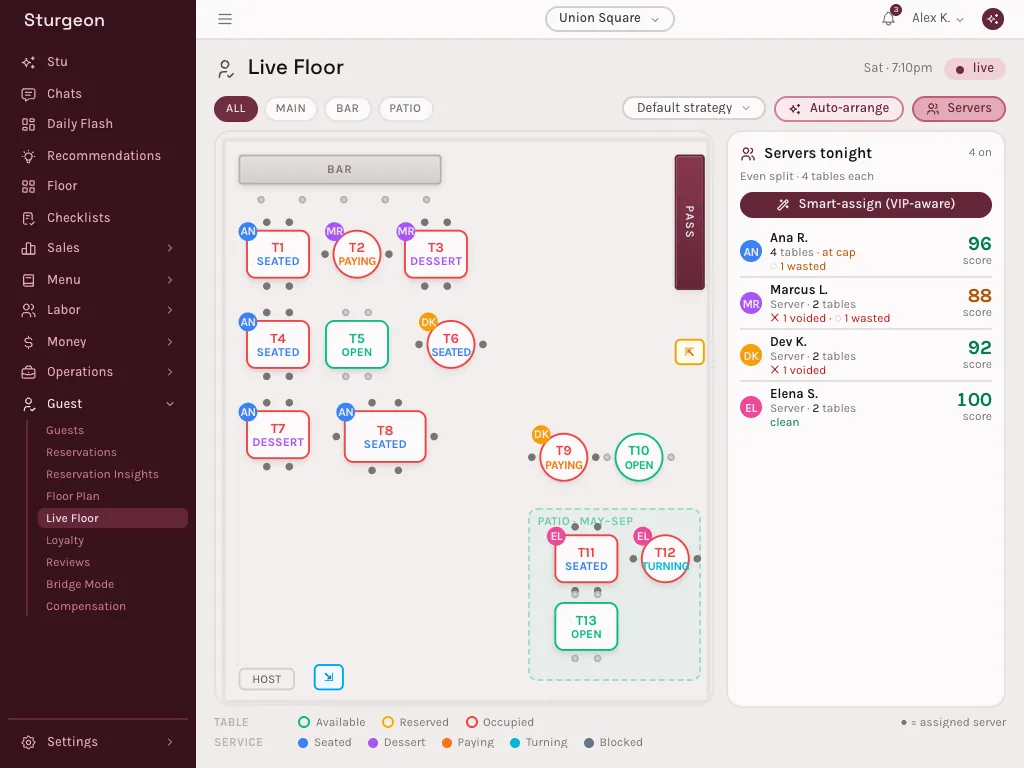
On Sturgeon's live floor, each table that seats goes to the server already covering the tables around it. It never goes past an even split, and VIPs go to the best-scored server. Sections stay coherent all night, and one tap re-balances the whole floor.
How it works
An even split, kept all night
Each server's load is counted in tables, against an even split of the night's tables across the servers on shift. A server at cap gets no more until the others catch up.
The nearest server takes the table
When a walk-in seats, it goes to the nearest server under cap: the one whose tables are already closest. Sections stay together instead of scattering across the room, and tables a server already owns are never taken away.
VIPs to your best
A VIP or an occasion table goes to the best-scored server under cap. The score comes from the POS: voids and wasted dishes count against it.
One tap to re-balance
Smart-assign re-runs the same rules over the whole floor and reports where every table went. Every assignment is logged with its reason, so the host can see why a table went where it did.
Questions
How does Sturgeon assign tables to servers?
By proximity and load. A table that seats goes to the nearest server who is under an even split of the night's tables; VIP and occasion tables go to the best-scored server under that cap.
How is a server's score calculated?
From the POS. Voided and wasted dishes on a server's checks lower their score, and the score decides who gets VIP tables.
Which plan includes the live floor?
The Full stack plan, which includes the live floor, seating, and the floor plan editor.
See your own numbers in Sturgeon in under a week, with your POS connected, your forecasts calibrated, and Stu answering. White-glove onboarding is included.
No credit card. No six-month contract. Your data stays yours.